Using LLMs for OCR and PDF Parsing
A practical look at using LLMs for OCR and PDF parsing. Best practices for text extraction, structuring outputs, and real-world document automation use cases.
Ståle Zerener
Co-founder & CEO
In this article, we look at how large language models (LLMs) are used for OCR and PDF parsing in real-world document automation workflows.
With over 10 years of experience as a machine learning engineer working on document processing systems, I’m often asked how models like ChatGPT have changed the way PDFs are parsed and structured in production. This post summarizes what I’ve seen work (and fail) when using LLMs for PDF parsing at scale, based on deployments across both startups and Fortune 500 companies.
If you’re just looking for a quick step-by-step guide on how to use LLMs to read documents, I recommend checking out some of the following articles:
- The 2026 Guide to Document Data Extraction Using AI
- Converting PDFs to JSON using LLMs
- Extracting tables from PDFs using LLMs
- Extract data from PDFs in Power Automate
- Extract invoice data in n8n
- A step-by-step guide to invoice data extraction with AI
How LLMs parse PDFs and documents
Most modern LLMs are based on the Transformer architecture introduced in the now-famous paper Attention Is All You Need (Vaswani et al., 2017). These models were originally trained exclusively on text, which meant they lacked an essential signal humans rely on when reading documents like invoices, receipts, or bank statements: visual structure.
This means that for the earlier LLMs, documents would be processed with limited or no visual structure. For example, from the LLM’s perspective, the first receipt could effectively be transformed to something like the second receipt:
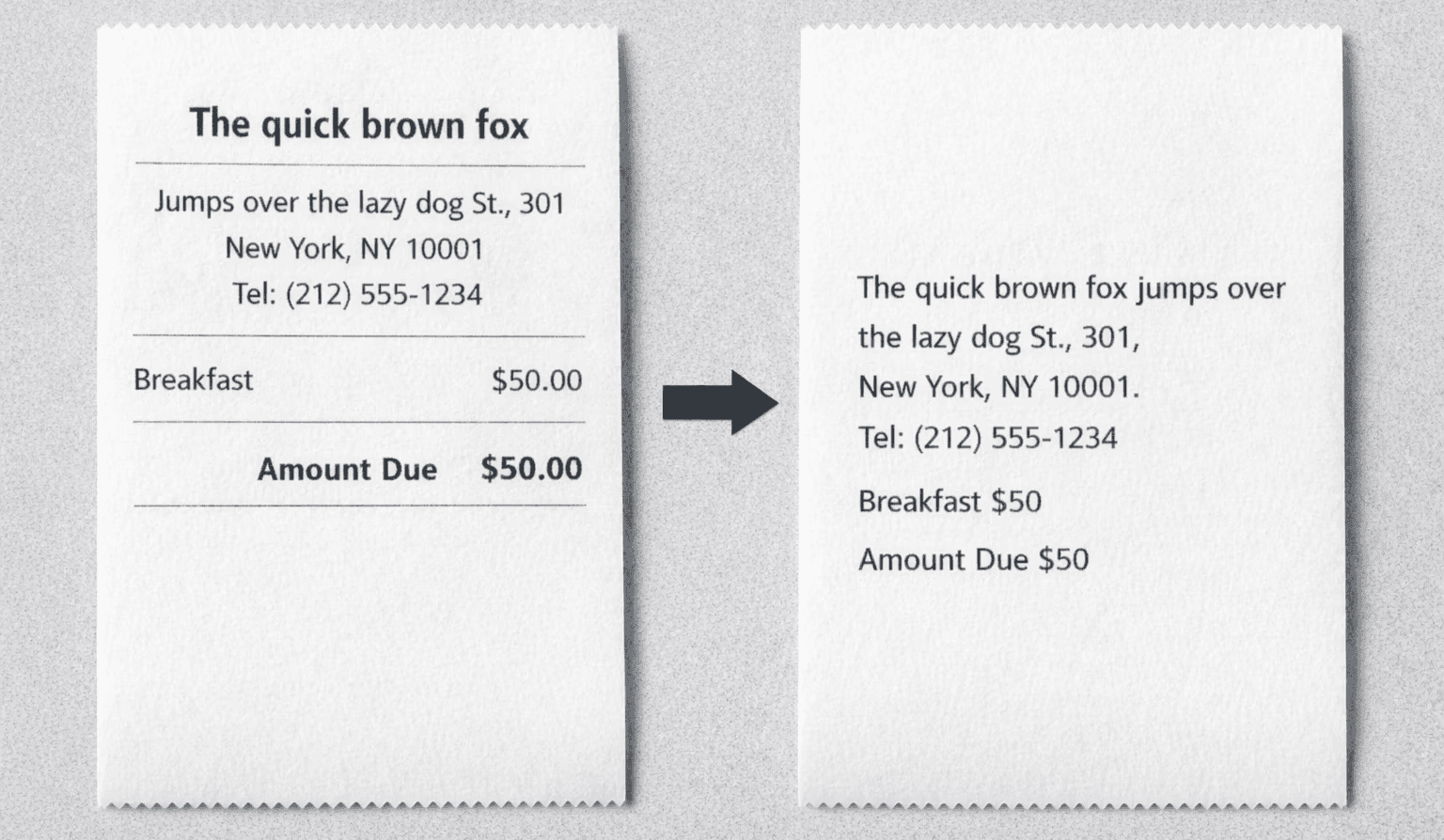
Even for a human, in the second receipt it would not be straightforward to infer that the vendor name is The Quick Brown Fox and that the address is Jumps Over the Lazy Dog Street since the visual structure that gives the document meaning has been stripped away.
Attempts at introducing layout as part of the context to the LLMs were explored in papers such as LayoutLM, and modern LLMs now incorporate rich information about documents and images, effectively solving this problem.
LLMs vs OCR for PDF parsing
The traditional way of reading scanned or photographed documents has been through optical character recognition (OCR). OCR has existed for decades and, along with other image-processing techniques, it has been greatly improved by deep neural networks.
OCR and LLMs serve different purposes. While LLMs have effectively learned to perform OCR, they have different strengths and weaknesses. If you have a scanned or photographed document that you simply want to make searchable, what you’re really looking for is an OCR engine.
In fact, modern OCR engines outperform state-of-the-art LLMs at OCR tasks. They typically achieve higher character recognition accuracy without the risk of hallucinations. Here’s a rough comparison of the two:
| Feature | Traditional OCR | LLMs |
|---|---|---|
| Text extraction | ✔️ | ✔️ |
| Context understanding | ❌ | ✔️ |
| Semantic understanding | ❌ | ✔️ |
| Coordinates / precise location | ✔️ | ❌ |
| Confidence scores | ✔️ (On word or character basis) | Usually no |
| Structured output | ✔️ | Usually no |
Example: Parsing a PDF with Qwen
Using an LLM like ChatGPT, Claude Sonnet, or Qwen to parse a PDF, either through an API or a chat interface, has become fairly straightforward. Once you upload a document, you can ask the model to extract specific fields and return them as structured JSON in a predefined format, for example:
Extract the following values from the document and return it in the following JSON format:
{ “total_amount”: “<….>”, “vat_number”: “<…>”, “supplier_name”: “<….>”, …. }
This works most of the time, especially when documents are clear and unambiguous. For scanned or photographed documents, the LLM will implicitly perform OCR as part of the extraction process.
That said, current LLMs will not give you any meaningful information about which information they are certain about and when they are uncertain. If the model is not certain whether a character is a capital I or the number 1, it will output whichever option seems most plausible, and you will get no indication that the LLM was guessing.
1. Text accuracy isn’t guaranteed
LLMs are not OCR engines. They can interpret text, but they aren’t built for reliable transcription. Some common challenges include:
- Dense or small text
- Numerical precision, especially when extracting long numbers
- Unusual layouts or aspect ratios
- LLMs can introduce errors by trying to “correct” text to what it thinks looks right
- Non-deterministic outputs and a lack of character-level confidence, making it hard to assess reliability
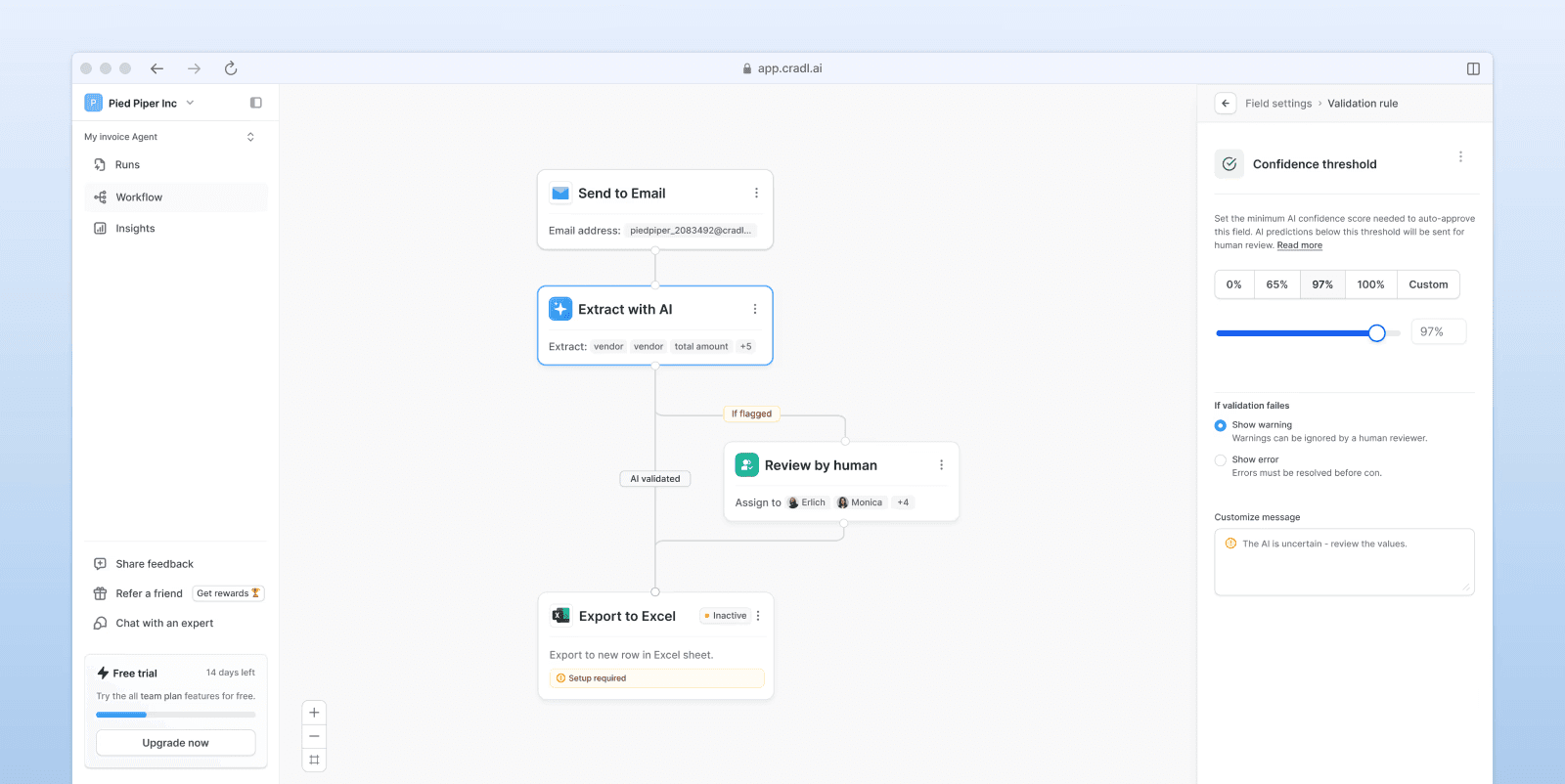
For business-critical workflows, this means safety guardrails are essential to detect when an LLM is likely to be wrong. We’ve found that relying on a dedicated OCR engine for text recognition and using LLMs for interpretation is much safer than depending on an LLM alone.
At Cradl AI, we address this by allowing users to configure automatic validators such as confidence thresholds or cross-validation checks to decide whether a prediction should be accepted or flagged for review. Ultimately, the right approach depends on the specific use case.
2. Detect hallucinations
The term hallucinations is often used as a catch-all for errors made by LLMs. In reality, these mistakes are a side effect of how the models work: they’re trained to generate text that sounds plausible and coherent, not to guarantee factual correctness.
Hallucinations usually stem from a combination of factors. But research like Lookback Lens (Zhang et al., 2024) shows a common pattern: models are more likely to hallucinate when they start relying on their own generated output instead of the original input.
That raises a practical question: how do you know what an LLM is actually paying attention to in a document? Thanks to the Transformer architecture behind modern LLMs, you can get a reasonable indication of this. Attention mechanisms make it possible to visualize which parts of a document influenced a specific prediction. At Cradl AI, we use this in our human-in-the-loop interface to show where the model pulled fields like invoice numbers from:
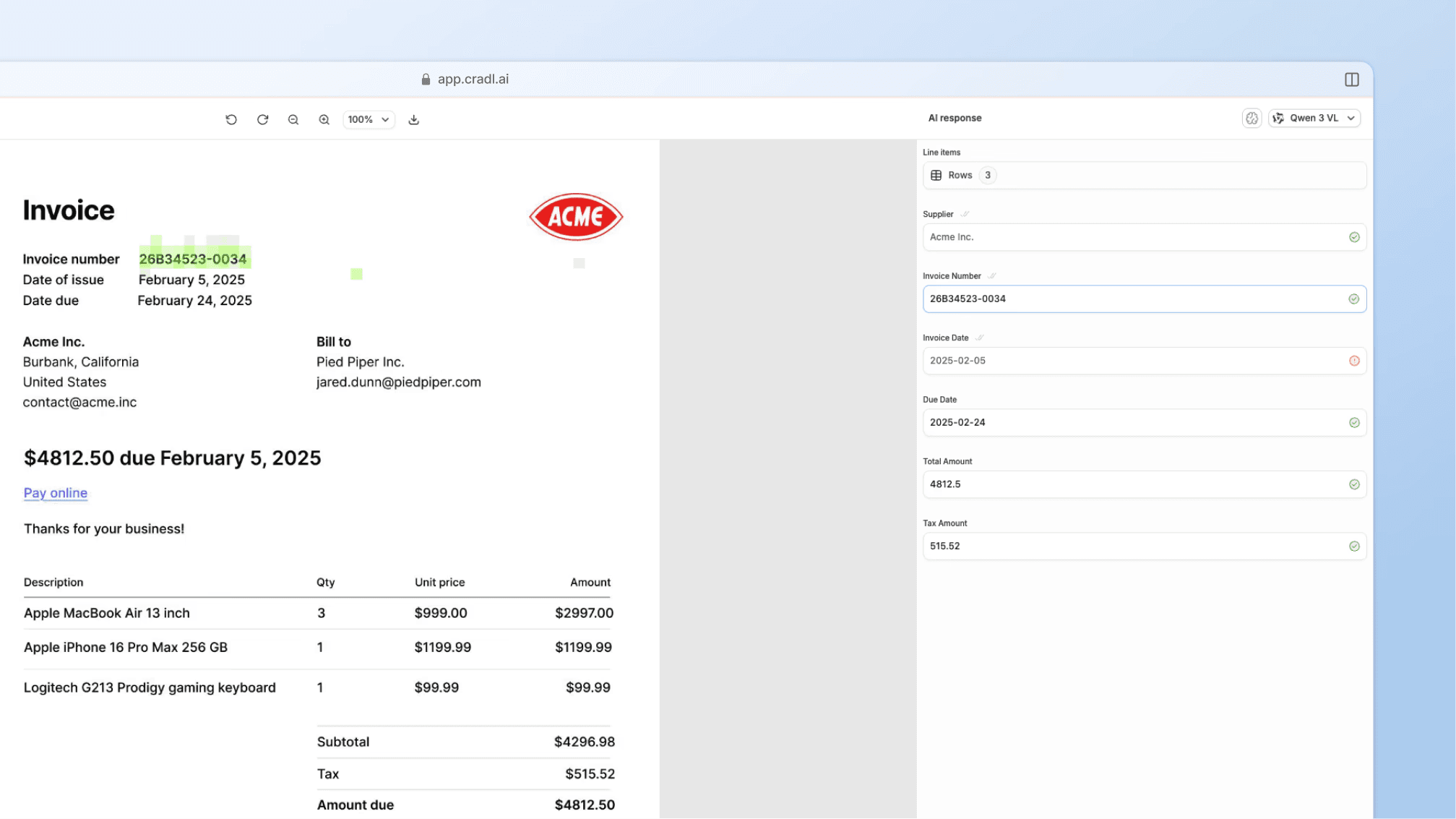
Based on this idea, the authors suggest a simple way to spot hallucinations: simply measure how much the model is focusing on the input versus its own output.
In practice, we’ve found this works best when combined with other checks like cross-validating extracted values against a second LLM or a dedicated OCR engine. Together, these signals make it much easier to catch hallucinations before they turn into production issues in document parsing workflows.
For implementation examples, the same review pattern appears in the Power Automate PDF extraction guide and the n8n invoice extraction guide.
3. Put a human-in-the-loop
When processing PDFs with LLMs, use cases can be broadly divided into two categories:
- Process automation, where a PDF that was previously processed by a human is instead handled by an LLM.
- Analytics or data mining, where a database or large document set is searched to perform calculations or derive insights.
In the first case, accuracy requirements are typically very high. The benchmark is human-level accuracy, and incorrect extractions can have serious downstream consequences.
In the second case, accuracy requirements are usually lower. Because you’re estimating trends or averages rather than extracting exact values, occasional errors are rarely critical — assuming you’re aware of them.
From our experience, a human-in-the-loop is almost always necessary in the first case and rarely necessary in the second. Including a human reviewer also has a psychological benefit for business teams: it creates a sense of control and reduces concerns about autonomous AI systems behaving unpredictably.
Wrapping up
Hopefully, this guide gave you a clearer picture of where LLMs fit into modern document parsing and where they don’t. If you’re looking for a straightforward way to automate document processing and data entry in back-office workflows, tools like Cradl AI can save a lot of time. If you’re building your own system from scratch, I hope these lessons help you avoid some common pitfalls.
Thanks for reading, and happy automating!